
Can I create several teams inside the same club?
Yes. NeoTactIQ lets the club create, edit and delete teams inside its structure. The number of teams depends on your plan's team slots.
Build the club's sporting structure and keep every team identified by age group, format, roster and staff. From the same area you organise groups that cut across age groups, such as goalkeepers or skills sessions, and the opponents database shared by every team.
With only a few age groups, it is easy to remember who coaches each team, which format they play and where the roster is stored.
The problem begins as the structure grows. A coaching change, a new age group or the start of a season can force the club to rebuild information that was scattered across spreadsheets, folders and conversations.
NeoTactIQ makes that structure visible inside the club itself: which teams make it up, who works with each one, and how to move straight into the operational context of every age group.
Create and configure every club team — age group, format, roster and staff — from a single place.
The Teams view brings the club's age groups for the season together in one place. For each team you see its name, age group, format (11-a-side, 8-a-side or 7-a-side) and the number of players and coaches, and its record keeps the crest and basic details.
From the same area, teams can be created, edited and deleted, keeping the structure current when an age group changes or a new season begins. Sporting management and coordinators can read the structure without rebuilding it from separate files.
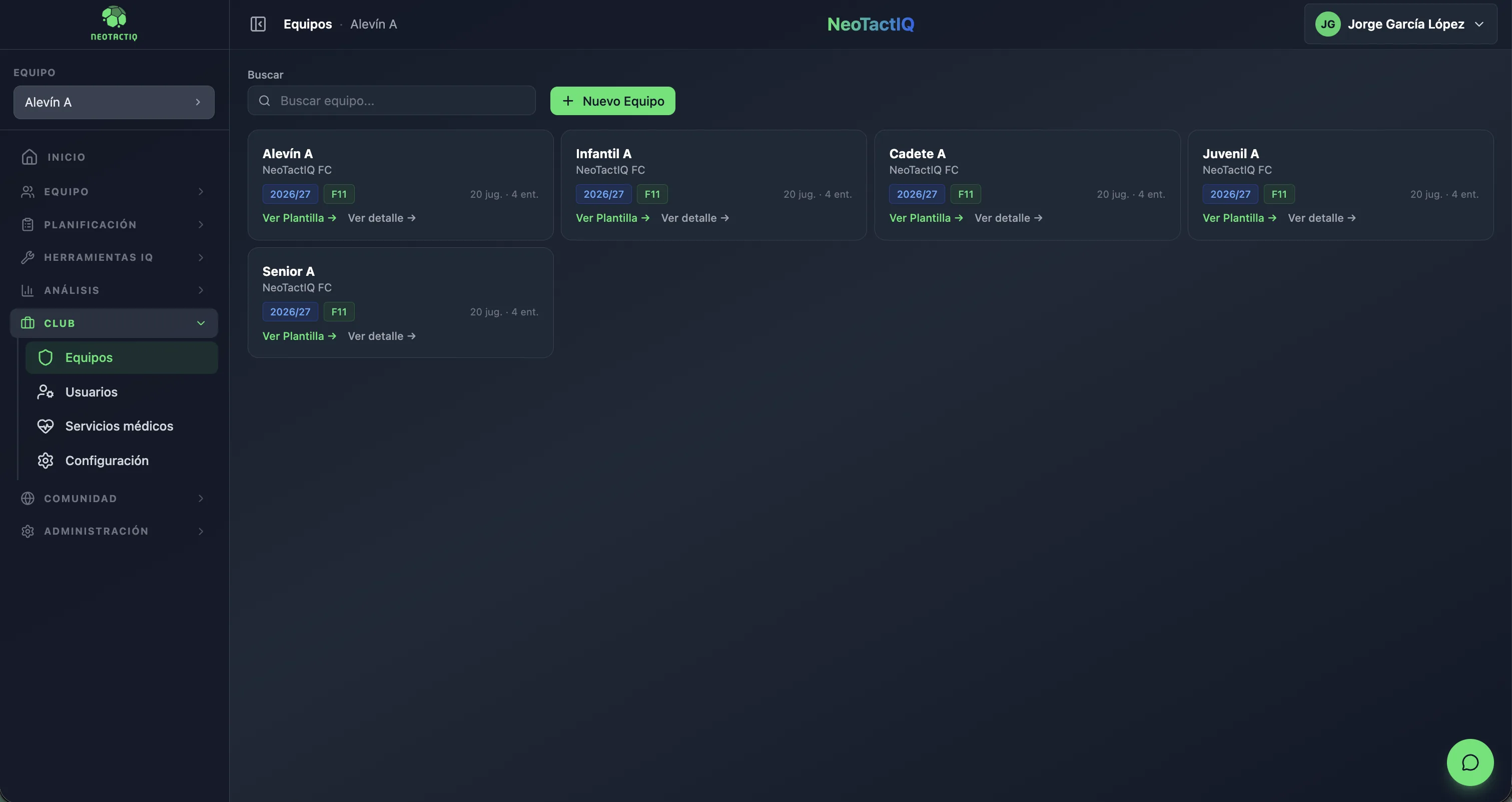
The team list is not an endpoint. From each team entry you move into the corresponding context and continue working with that team’s information.
View roster opens the team’s players, organised by lines and positions. View detail opens the team’s operational environment for the rest of its work.
Club structure and daily work stay connected: the team visible in the club-level view is the same team that later uses its roster, competitions, calendar and other features.
Some work does not belong to a single team. Specific groups bring together players from several teams in the club with their own coach: the goalkeeper group, a skills session or a strikers group.
When you add a team to a goalkeeper group, its goalkeepers are selected automatically, so you do not have to find them one by one. The group has its own training sessions without any player changing roster.
Opponents are stored once for the whole club: name, short name for match-squad graphics, crest, the grounds where they play at home and their teams by age group and letter. Each opponent shows how many matches have been played against them.
If two coaches added the same opponent separately, you can merge the duplicates and their matches are combined. The crest is uploaded once and appears in every match against that opponent (crest uploads are part of Coach Pro and Club).
Creating teams is only part of organising the club. You also need to decide who can work with each one.
NeoTactIQ uses three roles: Admin / Team Editor / Team Viewer. Each person accesses the platform according to their responsibility and coordinators can supervise without editing.
The team selector lets you switch age groups and see the dashboard for the selected one, moving quickly between team contexts inside the same organisation.
Yes. NeoTactIQ lets the club create, edit and delete teams inside its structure. The number of teams depends on your plan's team slots.
11-a-side, 8-a-side and 7-a-side.
Yes. Specific groups bring together players from several club teams with their coach, such as the goalkeeper or skills group, without anyone changing roster.
Yes. The opponents database is shared by the whole club, with crest, short name and grounds, and duplicates can be merged.
The club's teams should not depend on one person remembering how everything is organised. Keep every age group visible, connect it with its roster and staff, and share groups and opponents across every team.