
Do I have to enter statistics manually?
No. Match statistics are calculated automatically from the activity you record during games, and training statistics from the intensity and duration of each session.
Record the match as it happens and let that activity feed team and player statistics. Training adds its own view of intensity, volume and load. Everything comes from what you already record, without a separate spreadsheet.
Included in the Coach, Coach Pro and Club plans
You do not need to sit down on Monday and rebuild the match in a spreadsheet. During the game, you record goals, assists, shots, cards, saves and substitutions; NeoTactIQ keeps the timeline and uses that activity to calculate the statistics.
The principle is simple: record once, review later. Analysis does not begin with an empty worksheet. It begins with information already generated through your work with the team.
The data you record while training and competing becomes consultable statistics, without manual calculations.
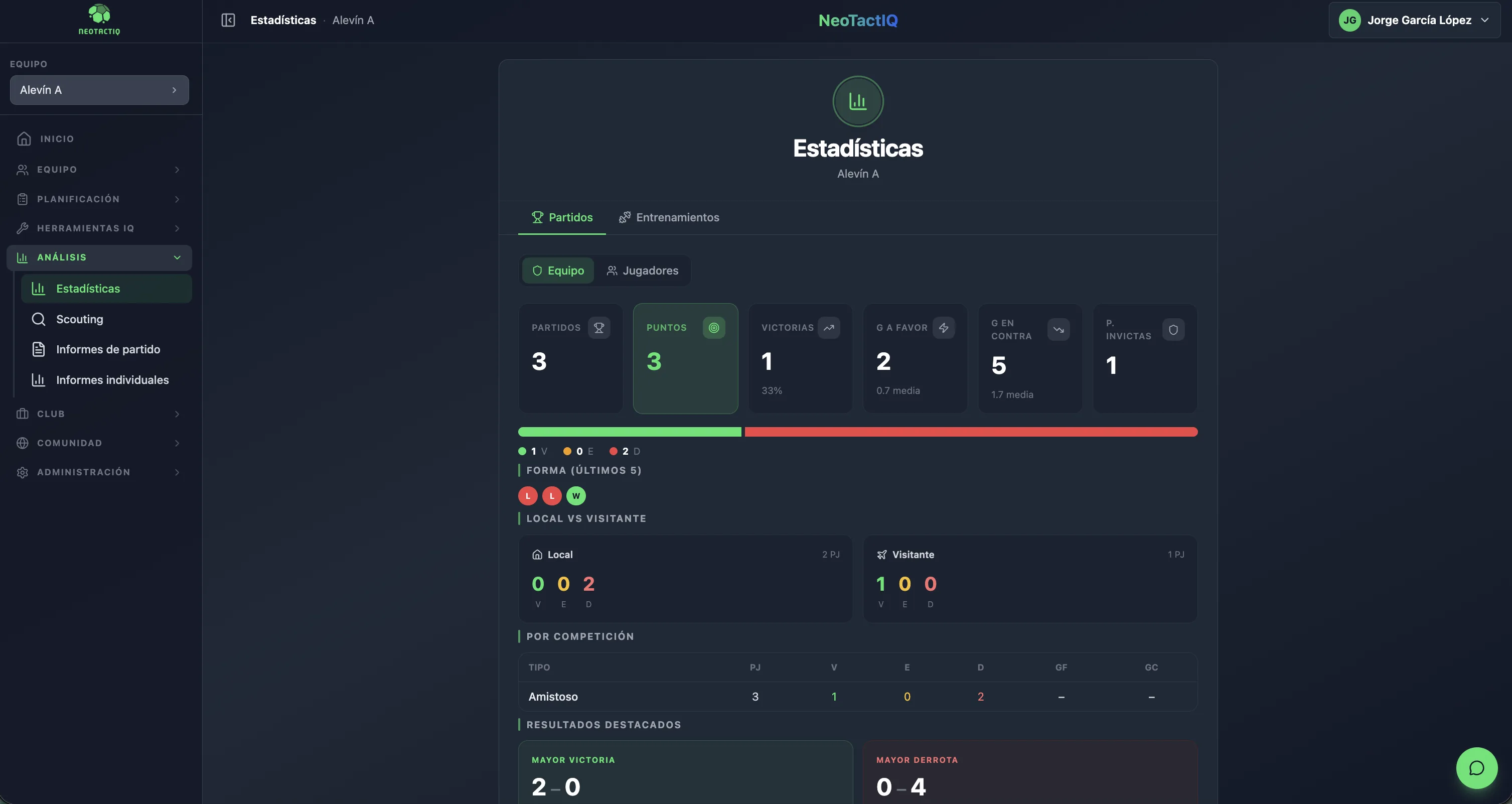
The team view brings together matches played, points, win percentage, goals for and against with their per-match average, clean sheets and the split of wins, draws and losses.
It also shows form over the last five matches, home and away performance, the biggest win and biggest defeat, and a breakdown by competition. You do not need to cross-reference several spreadsheets to answer basic questions about the season.
The player table, sortable by any column, shows matches played, starts, minutes, goals, assists, yellow and red cards and average rating for every player.
It is the most direct way to keep an eye on playing time, which matters in youth soccer and in large squads, and to start one-to-one conversations with data. With Coach Pro or Club, the same data fills each player’s individual report automatically.
The training view shows completed sessions, average intensity and average volume per session, the distribution of work by zone, phase and objective and a weekly load chart.
It comes from the target intensity and duration recorded for each training event, and complements the Methodology panel when you want to check whether the week was more demanding than planned.
How do we perform away from home compared with home games? What is our form over the last five matches? Who has the fewest minutes? How are we doing in a specific competition? What are our average goals for and against?
These are simple questions, but answering them reliably requires the data to be recorded and organised. With NeoTactIQ, you can spend your time interpreting what you see instead of building the table required to see it.
There is also an institutional benefit: the numbers do not depend on someone remembering where the spreadsheet lives. The information stays inside the system and remains part of the sporting context when people change.
Statistics answer “what happened”. When you need to assess why, the match report uses the same statistics and adds a rating by game moment, goals by time period and origin, and conclusions for the following week (Coach Pro and Club).
If your need is focused on players outside your current squad, see the Scouting area.
No. Match statistics are calculated automatically from the activity you record during games, and training statistics from the intensity and duration of each session.
Matches, points, win percentage, goals for and against with averages, clean sheets, form over the last five matches, home and away performance, biggest win and defeat, and a breakdown by competition.
For each player: matches, starts, minutes, goals, assists, cards and average rating. For training: completed sessions, average intensity, volume per session, distribution by zone, phase and objective, and weekly load.
No. Statistics are part of every paid plan (Coach, Coach Pro and Club). The Free plan includes the tactical board, 3 drills and 3 set plays.
Statistics provides a view of activity recorded with your team. Scouting is focused on players being followed for recruitment and keeps their profiles and statuses inside the club.
You do not need a second spreadsheet routine after the game. Record matches and training in NeoTactIQ and return later to the statistics generated from that activity.
Included in the Coach, Coach Pro and Club plans