
Skip to content
Soccer training management

Training sessions with objective, load and attendance in one record

Each training record brings together when and where you train, the phase and zone you want to work on, the objective, the target intensity, the session plan you will use and who actually turned up. Once saved, it sits inside its microcycle, and attendance and load later feed your statistics and each player’s follow-up.

Included in the Coach, Coach Pro and Club plans

A training day should not end up split across four tools

The date is in your phone calendar. The content is in a notebook. The attendance list is on another sheet. The monthly plan is in a spreadsheet. A few weeks later, remembering why you prepared that training day, who missed it or how it fitted the microcycle means rebuilding the context.

NeoTactIQ treats each training event as part of the season. Operational, football and attendance information stays together in the same record and is connected to the relevant methodological structure. You can return later to what was planned, who took part and which period it belonged to.

Inside the training record, field by field

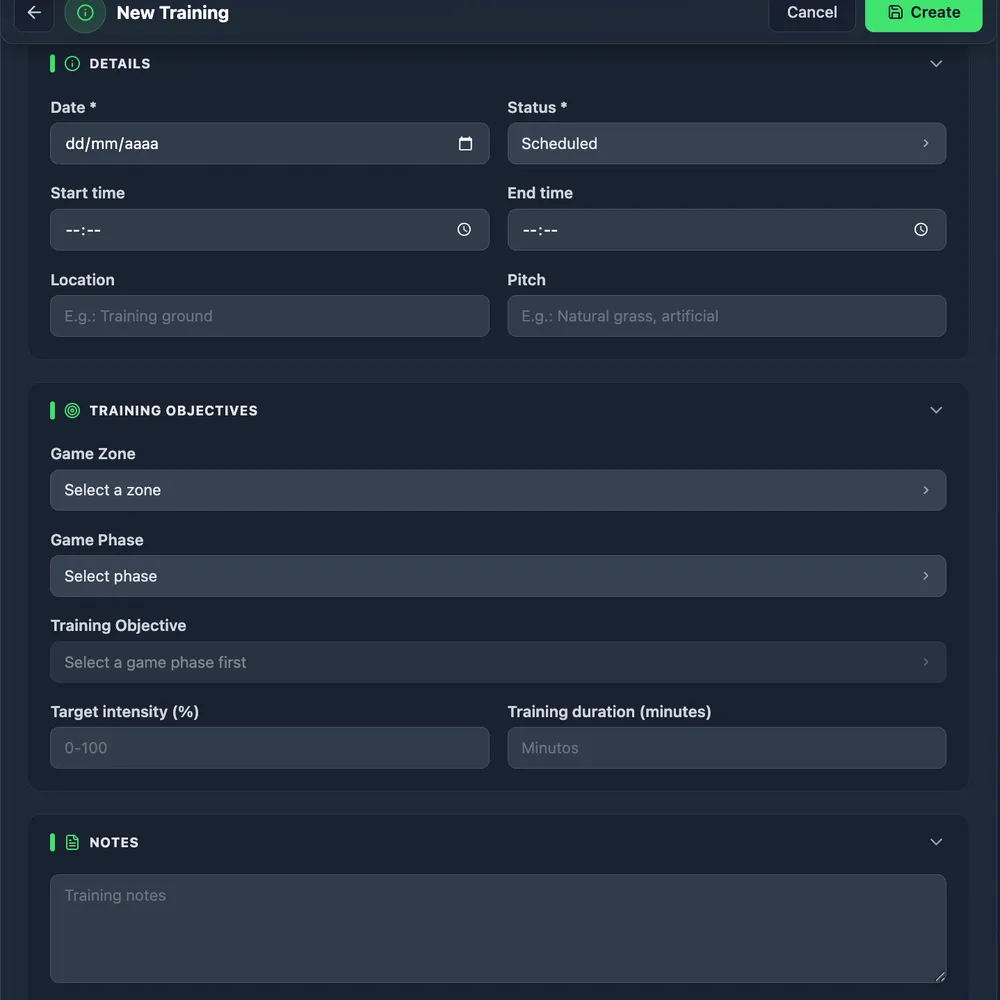
The date places the training event on the calendar and connects it with its cycle. Start and end time, duration, location and surface type cover the operational side. You then define the pitch zone, game phase and training objective to make the football intention clear, and the target intensity (%) completes the planned load for that day. Notes keep whatever does not fit in a field.

The result is one record that preserves both the “when and where” and the “what and why” of training.

Every training event brings logistics, cycle, zone, phase, objective and load together in one record.

Creating a training event in NeoTactIQ
Logistics, zone, phase, objective and load brought together in the training record.

The day’s session plan, linked to the training event

Content does not need to be copied into every training event by hand. You can link a session plan from your library, with its warm-up, main and closing parts, or add individual drills when the day calls for something different.

The record therefore keeps what was actually done on the pitch, while the session plan stays available to repeat or adapt in another week without rebuilding it.

Player-by-player attendance with clear codes

Taking attendance takes seconds: mark each player with a code, or use “Everyone attended” and correct only the exceptions. Every absence is recorded with its reason instead of living in a notebook or a lost message.

Attendance does not stay inside the training event. It gives you a factual basis for team rules and appears in each player's individual report, which shows excused and unexcused absences for the period (reports are included in Coach Pro and Club).

  • A · attended
  • FJ · excused absence
  • FN · unexcused absence
  • L · injury
  • E · illness
  • SC · moved up a category

Every training event stays inside its cycle

You do not need to classify each training event manually after creating it: its date assigns it to the right microcycle. That microcycle, in turn, sits inside the corresponding mesocycle and macrocycle.

This connection lets you move from one training day to a wider view of the season. You can look back at Friday's work knowing which methodological block it belonged to and what that week's objectives were.

Each training event is automatically assigned to its microcycle according to its date.

From the club timetable to a training event in one click

If your club publishes its weekly pitch timetable in NeoTactIQ, every slot assigned to your team appears on the calendar as a planned training event. Turning it into a real training event takes one click: date, time and facility are already filled in.

The timetable is built in Facilities and schedules, a feature of the Club plan.

Statuses, documents and a PDF record

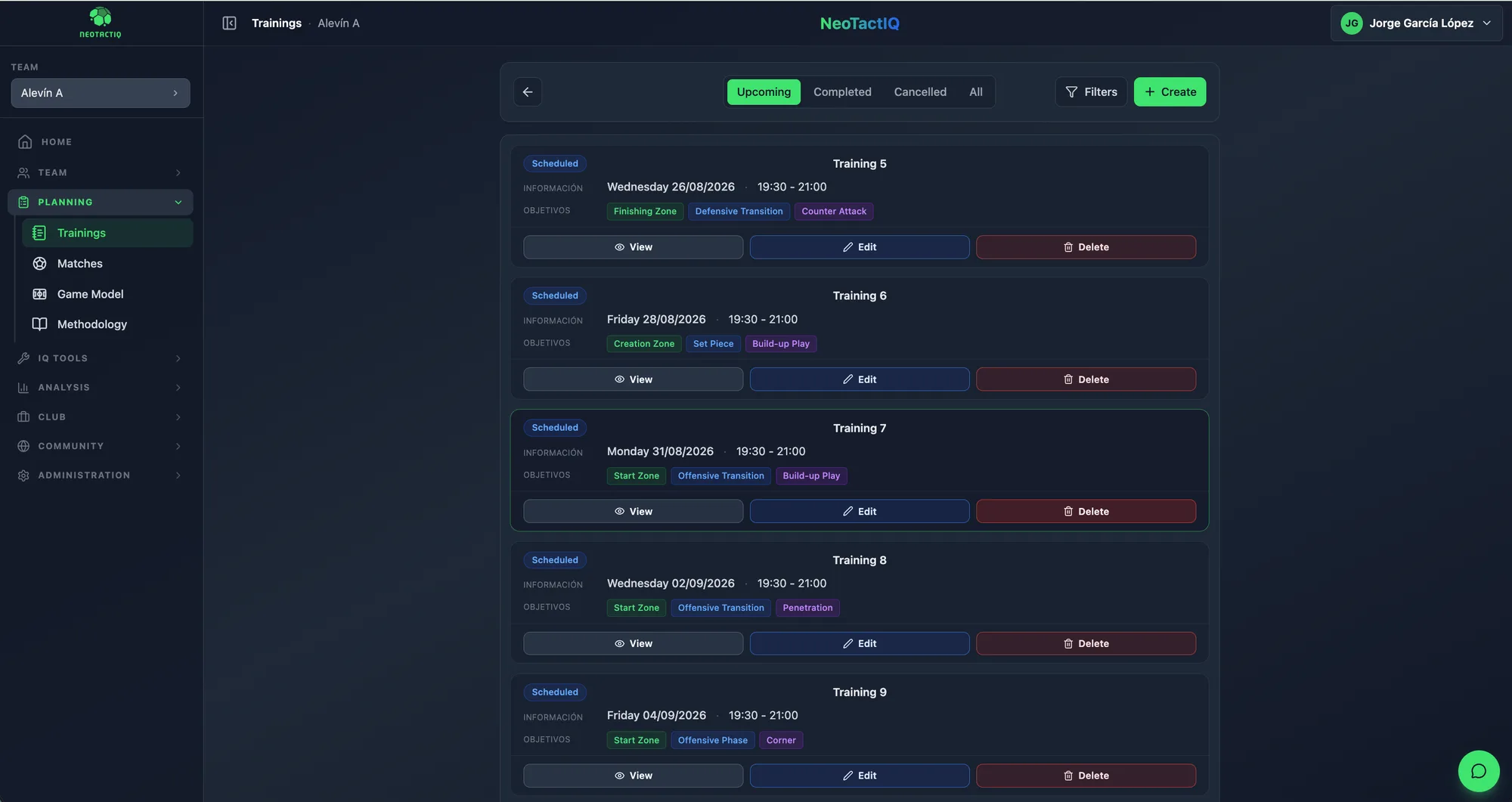
A training event can be scheduled, in progress, completed or cancelled. Its status lets you distinguish what is planned from what has already happened and keep the history aligned with the way the season actually unfolded.

You can attach PDF documents of up to 20 MB (a presentation, a fitness coach's report) and download the training record as a PDF for the rest of the staff.

  • Scheduled
  • In progress
  • Completed
  • Cancelled
Training list with statuses in NeoTactIQ
The list shows the status of each training event across the season.

What you record feeds the view of the work

The training record still has value after the day itself. The phase and zone you record feed the Methodology panel, which shows how work is distributed across phases and zones and flags imbalances.

Intensity and duration feed Statistics › Training: average intensity, volume per session and weekly team load. You do not need to rebuild the numbers in a parallel spreadsheet.

Frequently asked questions

How do I take attendance in NeoTactIQ?

From the training record you mark each player with a code: A (attended), FJ (excused absence), FN (unexcused absence), L (injury), E (illness) or SC (moved up a category). With “Everyone attended” you only correct the exceptions.

Can I link a session plan I have already prepared?

Yes. You can link a session plan from your library or add individual drills to the training event. The session plan remains available to reuse another day.

What are planned training events?

They are slots from the club’s official timetable that have not yet become training events. They appear on the calendar and convert with one click. The pitch timetable is a Club plan feature.

Can I attach documents or export the record as a PDF?

Yes. Each training event accepts PDF documents of up to 20 MB and generates its own PDF record.

Is it included in the Free plan?

No. Training is part of every paid plan (Coach, Coach Pro and Club). The Free plan includes the tactical board, 3 drills and 3 set plays.

From one training event to planning you can review

For a wider view of the week, the football session planner shows how each training event fits into microcycles, objectives and session plans. If the methodological framework is already clear, the Planning module covers Methodology, Training, Matches and Match plans inside the same workflow.

Included in the Coach, Coach Pro and Club plans